
Stringing Solutions
Are you printing unwanted thin strings of plastic between parts of your model?
This happens when the print head moves over an open part of your 3D print model and filament has dripped from the nozzle.
There are a couple of solutions to this 3D printing problem:
- Most 3D printers and 3D printing software has a feature called retraction. When this feature is enabled, the filament is slightly retracted before moving over any open spaces. Although retraction usually works, it is possible to still see some stringing. In this case be sure to also follow the next solution.
- Try lowering the nozzle temperature. All filament should come with an optimum extrusion temperature setting label. If your nozzle temperature is within this temperature range, but too high, it causes the melted filament to be too liquid. Dropping the nozzle temperature by 5 degrees celsius and trying your print again to see if stringing is minimized or removed is one way to a solution. Please keep in mind that if nozzle temperature is decreased, print speed may also need to be decreased to ensure the filament will completely melt prior to leaving the nozzle.
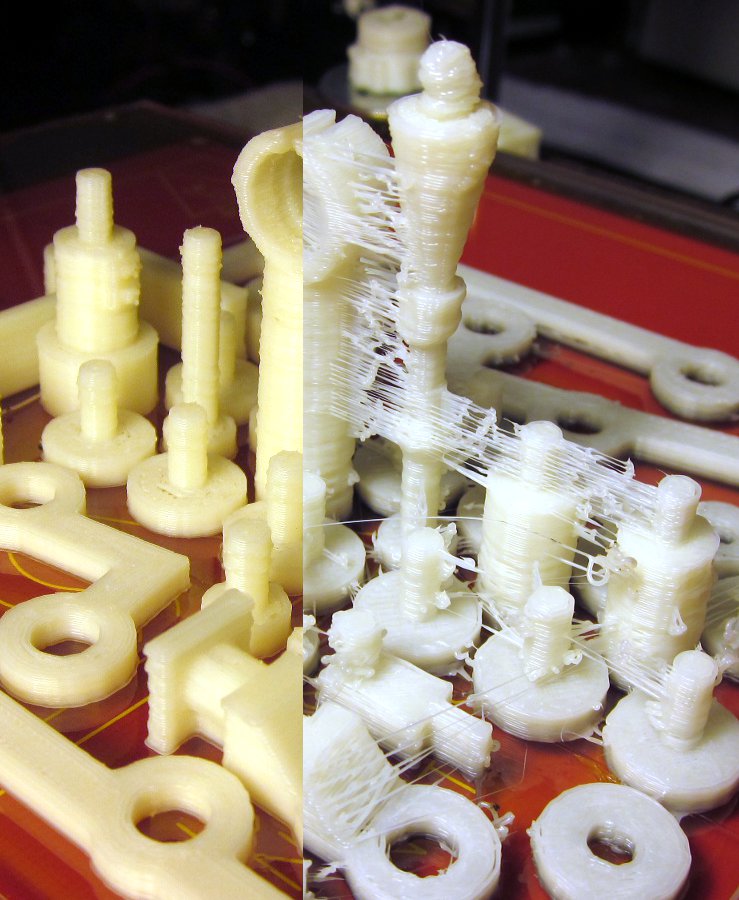
The image below shows an example of stringing and what can be achieved using the above solutions. Image courtesy of jridley2000 on flickr.
November 19, 2015
Recent Posts
-
Fix Rough 3D Print Top Layers & Pillowing | Spool3D
The walls look good. The corners are clean. Then the printer reaches the top of the part and leave …October 14, 2026 -
3D Prints Splitting Between Layers? Causes & Fixes for Weak Layer Adhesion
A 3D print can have a smooth surface, tidy corners and a clean top layer, then split the first time …October 08, 2026 -
3D Printer Under-Extrusion: Causes, Fixes & Troubleshooting
Under-extrusion happens when your 3D printer deposits less plastic than the slicer expects. The res …October 06, 2026